Terrain and water
Sculpt your world’s ground: a height grid up to 256 × 256, brushes, painting, scattering props, generators, smooth terrain and swimmable water.
Terrain is the base of every Sandbox world: a grid of block columns, each with its height and colour. You sculpt it with brushes on the Map step, paint it, scatter vegetation on it, then add an animated water plane the player can swim in.
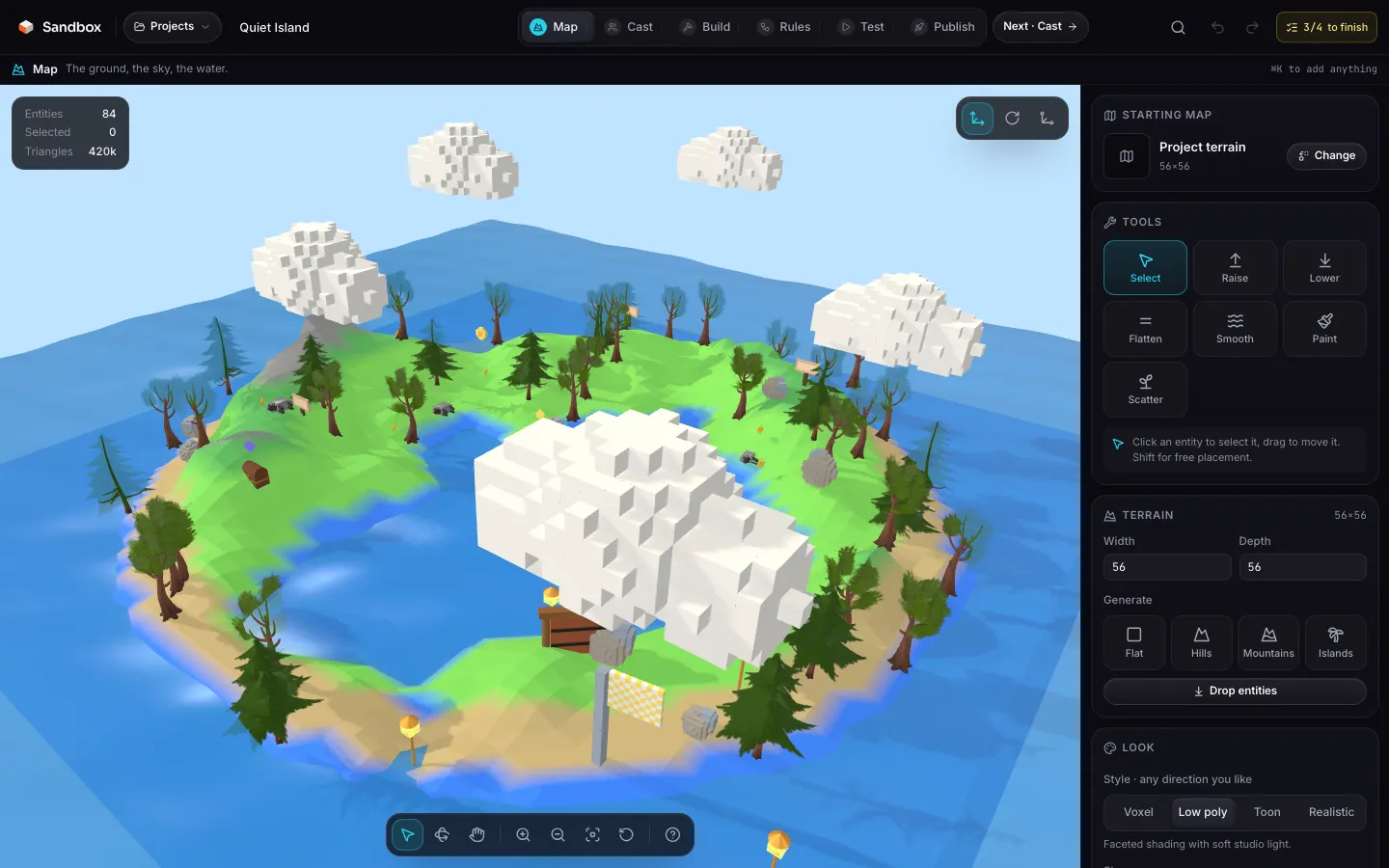
The height grid
The terrain (Terrain) is width × depth cells, from 8 to 256 per side, set in steps of 4 in the Terrain section. A blank project starts at 48 × 48. Each cell has an integer height in blocks and a colour index; the centre of the grid is the world origin.
widthnumberrequireddepthnumberrequiredheightsnumber[]requiredwidth × depth values in row-major order.colorsnumber[]requiredpalettestring[]requiredcellnumberDefault 1Starting from a landscape
Four buttons replace the landscape in one click (undoable):
| Button | Result |
|---|---|
| Flat | Every cell at height 1, grass colour. |
| Hills | Gentle relief, amplitude 2.5. |
| Mountains | Strong relief, amplitude 5. |
| Islands | Amplitude 4, hollows become water instead of sand. |
Generators also colour the relief: stone on top, dark grass on slopes, grass in between, sand or water at the bottom. “Drop entities” lifts any entity that ended up below zero.
Sculpting with brushes
Pick a tool in the Tools section of the Map step, then click or drag on the terrain. The brush radius goes from 1 to 8 cells.
| Tool | Effect |
|---|---|
| Raise | Raises the terrain by one block under the brush (24 blocks at most). |
| Lower | Lowers by one block (0 at least). |
| Flatten | Sets the whole area to the height of the clicked cell. |
| Smooth | Replaces each height with the average of its neighbours. |
| Paint | Applies the chosen terrain colour. |
| Scatter | Sprinkles the chosen asset as props (see below). |
| Gesture | Action |
|---|---|
| Left click / drag | Applies the tool; a whole drag is a single undo step. |
| Right drag | Orbit. |
| Middle drag | Pan. |
| Wheel | Zoom. |
| Key | Action |
|---|---|
| CtrlZ | Undo. |
| CtrlShiftZ | Redo. |
| Esc | Clear the selection. |
Terrain colours
The terrain palette has twelve colours, each one recolourable with the picker. The choice matters for gameplay: asphalt is fast for karts, grass slows them down.
| # | Name | Colour |
|---|---|---|
0 | grass | #7ed957 |
1 | dark grass | #5cb85c |
2 | sand | #c8b078 |
3 | stone | #8d8d8d |
4 | asphalt | #3a3733 |
5 | concrete | #e8e4dc |
6 | water | #3a86ff |
7 | snow | #f8f4ec |
8 | dirt | #a0522d |
9 | lava | #ff5c1a |
10 | moss | #2fb56b |
11 | night | #1f2a44 |
Scattering props
Pick the Scatter tool
Pick an asset
The project’s assets list shows under the tool: ferns, rocks, trees…
Drag over the terrain
Each pass drops a few copies within the brush radius, with a random rotation and a scale from 0.7 to 1.3. They get the
proprole.
Stepped or smooth terrain
By default terrain renders as steps: crisp columns of blocks, ideal for voxel worlds. The smooth terrain box (rules.smoothTerrain) keeps exactly the same data but builds a continuous surface: every vertex takes the average of the four cells around it, for rolling hills.
Water
Tick Water in the Look section to add a water plane across the world. It is a subdivided plane animated with waves, with a physical material that picks up the sky and the environment, in a single draw call. When enabled, water starts at level 0.4, blue, opacity 0.75, waves 0.5.
levelnumberrequiredcolorstringrequiredopacitynumberrequiredwavesnumberrequired{
"smoothTerrain": true,
"water": { "level": 0.4, "color": "#3a86ff", "opacity": 0.75, "waves": 0.5 }
}Swimming
An actor whose centre drops below the water level swims: gravity falls to 15 % and its speed is damped. In on-foot modes, Space rises and Shift dives. NPCs and enemies route around deep water when they find their way (pathfinding).