Publishing a game
From the Publish step to the game page: what’s missing, the cover, pinning the document, on-chain or signed draft registry, updates and remixes.
Publishing makes your game playable by everyone at /play/<id>, lists it on the games page and makes its plays count toward rewards. It all happens on the studio’s Publish step.
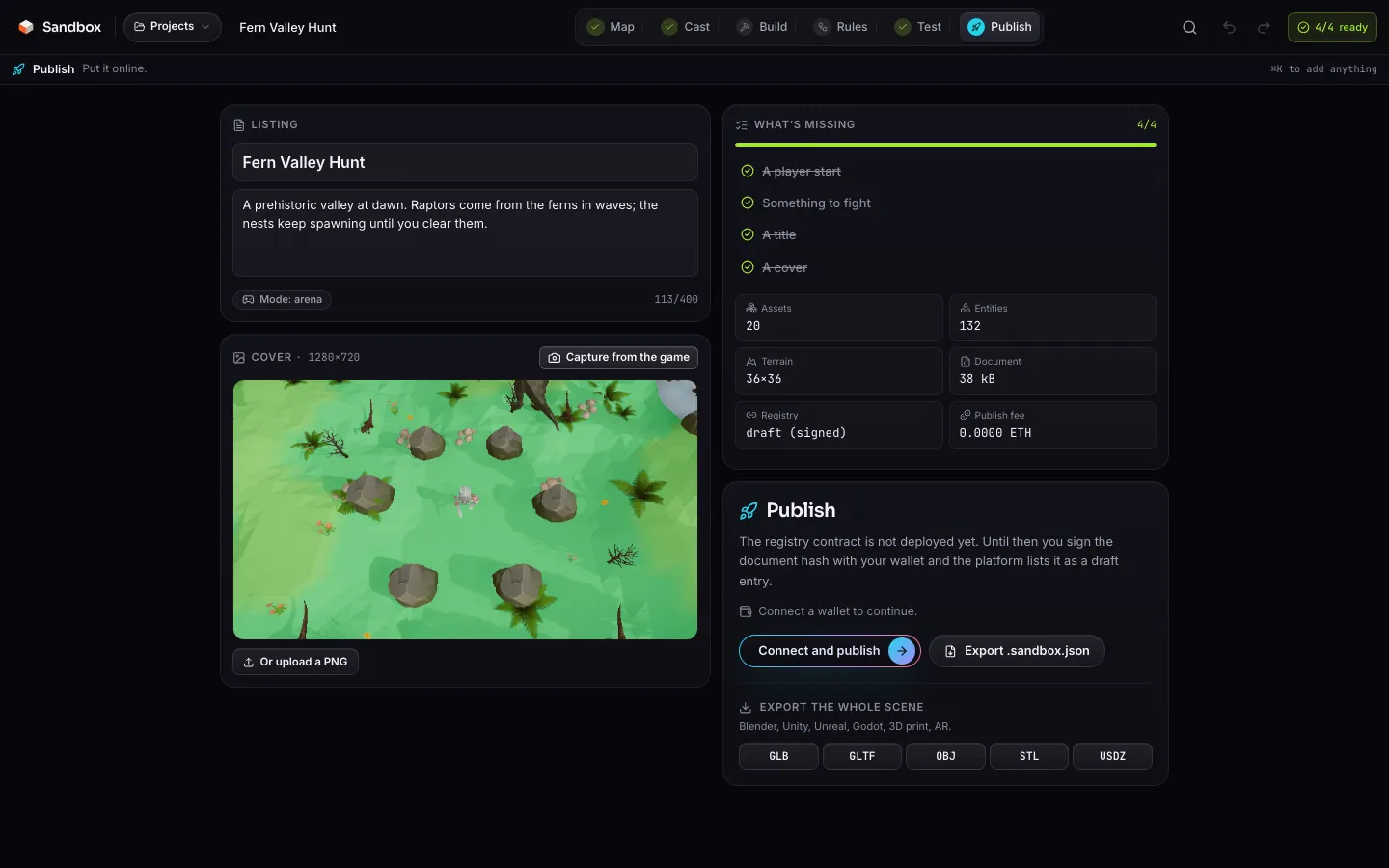
Before you publish
The listing
A title (64 characters max) and a description (400 max): what it is, how you win, what makes it yours. The game mode comes from the document.
The cover
The cover is a 1280×720 image. Capture from the game renders the start of your game with the real runtime; you can also upload a PNG. It is sent with the document and capped at 2 MB.
What’s missing
The What’s missing list counts four things. It is open here, and summed up by the “x/4” chip in the top bar, wherever you are in the studio. The Publish button stays disabled until the list is complete, and every line still open is clickable: it takes you to the step that fixes it.
| Item | Fixed on | What counts |
|---|---|---|
| A player start | Cast | An entity with the player start role: it comes with the character you pick. |
| An objective for the mode | Build | A finish or checkpoints (race); a finish or coins (platformer); an enemy, a spawner or an enemy spawn (arena); obstacles, hazards or coins (runner); coins, signs, NPCs or a key (explore); a flag and a base (capture the flag); waypoints and a base (tower defense). |
| A title | Publish | A non-empty title, and not “Untitled”. |
| A cover | Publish | Captured from the game or uploaded as a PNG. |
The server then validates the document again: known format, title and description, existing mode, at most 96 assets and 3,000 entities, consistent terrain, imported models of 12 MB at most, URL models served from the platform’s storage, and a player start.
The flow
Connect a wallet
Publishing requires a wallet on Robinhood Chain. When the token threshold is armed, it must hold 1,000$SANDBOX.Pin the document
The studio sends the document and cover toPOST /api/games/upload. The server validates them, canonicalises the JSON (sorted keys), computes its keccak256 hash and stores it atobjects/<hash>.json(and the cover atobjects/<hash>.png). It returns{ hash, uri, cover }.Register the hash
On the contract when it is deployed, otherwise with a signature from your wallet (see below).List the card
The studio callsPOST /api/games/register, which writes the game card. Your game is live: the studio shows the link to its page and keeps it in the project for updates.
/api/games/uploadvalidates, hashes and stores/api/games/registerwrites the cardRequest bodies and responses in detail: HTTP API.
On-chain or draft registry
Until the contract is deployed, your wallet signs this message (no transaction, no fee):
Sandbox publish
title: <title>
hash: <0x…>
The server checks the signature and the token threshold, then creates the card with the id d- followed by the first 10 hex characters of the hash. The creator is the signing address. Republishing the same document keeps the id and bumps the version.
Coming soon Once the contract is deployed, your wallet sends a publish(contentHash, uri, title) transaction, paying the publish fee if any (capped at 0.01 ETH by the contract). The game id is the on-chain id, and the platform reads the card (creator, title, version, hidden flag) back from the chain; it refuses when the on-chain hash does not match the document.
function publish(bytes32 contentHash, string calldata uri, string calldata title) external payable returns (uint256 gameId);The token threshold
Publishing is reserved for wallets holding at least 1,000 $SANDBOX. The studio shows the threshold state (open or closed, with your balance) and the server checks it again in draft mode. The threshold only concerns publishing: playing, ranking and tipping stay open to everyone.
Before the token launches
Updates
A project that is already published shows Publish an update. The new document is pinned under its new hash; on the contract, update(gameId, contentHash, uri, title) keeps the same id and bumps the version (only the creator can call it). Players always get the latest version, and plays count for the same game.
Draft mode
d-… id, hence a new game page.Remixes
The Remix button on every game page opens a copy of the document in your studio (/studio?remix=<id>). For a game published on-chain, the document keeps the original id in meta.remixOf, and the remix page links back to the original.
Hiding and transferring
On the contract, the creator (or the contract owner, for moderation) can hide a game with setHidden; a hidden game no longer accepts tips. transferGame hands the game to another address, and shares of already settled epochs that have not been claimed follow the game. See The Sandbox.sol contract.
Backing up off platform
The Publish step also exports the project as .sandbox.json (re-importable into the studio) and the whole scene as GLB, glTF, OBJ, STL or USDZ. See Export.