Rules and events
The no-code rules engine: when an event happens, if the conditions hold, run actions. A complete reference of events, conditions and actions, with examples.
A rule reads like a sentence: when something happens, if some conditions hold, then do actions. Rules cover most logic needs without writing a line of code, and stay readable by anyone.
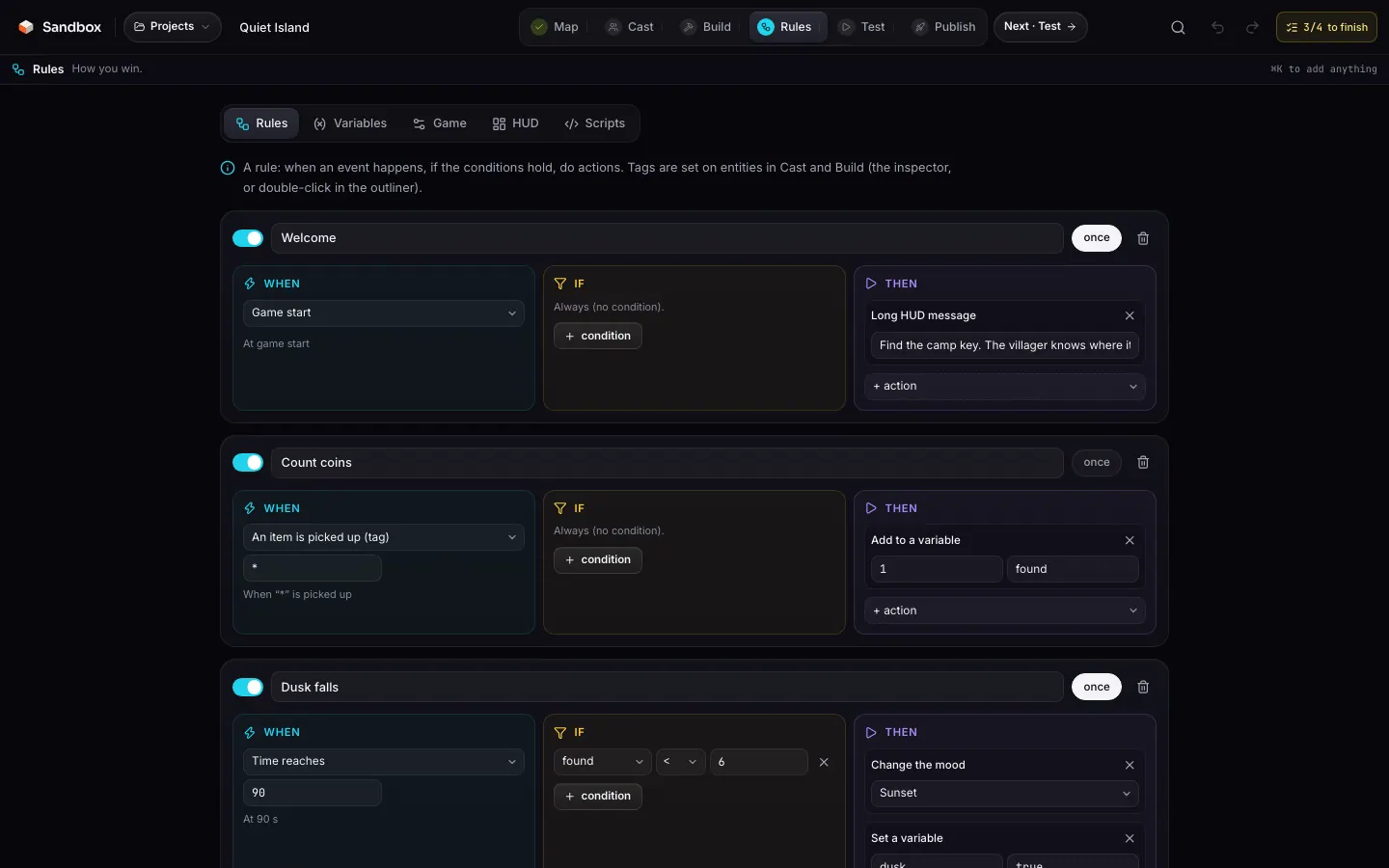
Anatomy of a rule
Rules live in doc.gameRules. They are evaluated in document order, only while the game is running (after the countdown).
idstringrequirednamestringrequiredenabledbooleanrequiredoncebooleanrequiredeventRuleEventrequiredconditionsRuleCondition[]requiredactionsRuleAction[]requiredTag your entities
On the Cast and Build steps, give atagto the entities that should trigger something (the Tag field of a cast row, a double-click in the outliner, or the inspector’s tag field).Create the variables
Conditions work on variables, see Variables and HUD.Write the rule
Rules step, “New rule”: pick the event, add conditions, then actions. A sentence under the event sums up what you set.Test
Test step: rules run in the same runtime as the public game page.
Events
| on | Fields | Fires | Studio wording |
|---|---|---|---|
start | — | Once, when the game starts (end of the countdown). | At game start |
tick | every | On the first frame, then every every seconds. | Every N s |
timer | seconds, repeat | After seconds from the start; repeatedly if repeat. | After N s, repeating |
time | atLeast | When game time crosses the value. | At N s |
score | atLeast | When the score (mode + bonus) crosses the value. | When score reaches N |
variable | name | On the frame after a change made by a setVar or addVar action. Writes from a script (sandbox.set) do not fire it. | When “x” changes |
touch | tag | The player makes contact with an entity carrying this tag. | When the player touches “x” |
enter | tag | The player enters a trigger zone carrying this tag. | When the player enters “x” |
leave | tag | The player leaves that zone. | When the player leaves “x” |
interact | tag | The player presses E in contact with an entity carrying this tag. | When the player presses E near “x” |
pickup | tag | A coin or key carrying this tag is picked up. | When “x” is picked up |
kill | tag | An enemy carrying this tag is killed. | When “x” is killed |
Tags and wildcard
Tagged events target an exact tag, or * for any. Only entities that have a tag emit these events: an untagged coin does not fire pickup, even with *. Sources are detailed in Tags and events.
Thresholds
score and time fire when the threshold is crossed, not while the value stays above it: a “score ≥ 1000” rule fires once, on the frame the score passes the bar. Without once, it would only fire again if the score dropped and rose back.
Conditions
namestringrequiredop'==' | '!=' | '>' | '>=' | '<' | '<='requiredvaluenumber | boolean | stringrequiredtrue / false and numbers are recognised, the rest is text.| Type | Comparison |
|---|---|
| Number | Compared as is. |
| Boolean | Turned into 1 (true) or 0 (false) on both sides: alive == 1 is the same as alive == true. |
| Text | Compared as text for == and !=; turned into a number for >, <… |
| Missing variable | Read as empty text. |
Actions
A rule’s actions run with the player as their source: a spawn appears around them, a score bursts its particles on them.
| type | Fields | Effect |
|---|---|---|
message | text | HUD message for 2.5 s. |
hud | text | Long HUD message, 6 s (objective, instruction). |
score | value | Adds to the score. |
setVar | name, value | Sets a variable. |
addVar | name, value | Adds to a numeric variable (text converted, 0 if unreadable). |
spawnAt | asset, role, tag, count | Spawns up to 20 entities around a random entity carrying this tag (or the player). |
removeTag | tag | Hides every entity carrying this tag. |
showTag | tag | Reveals every entity carrying this tag. |
teleport | x, y, z | Teleports the player. |
heal / hurt | value | Heals or hurts the player (platformer, arena, CTF). |
speed | value, seconds | Multiplies the player’s speed for a while. |
unlock | key | Grants a named key. |
timer | name, seconds | Starts a named timer. No rule event reacts to it today: to act after a delay, use the timer event or sandbox.timer in a script. |
mood | preset | Applies a mood mid-game: sunset, neon, mist, prehistoric, underwater, cartoon, snow, void. |
sound | url | Plays a sound (volume 0.6), or a beep with no URL. |
win / lose | text? | Ends the game with that message. |
endRound | won | Ends the game, won or lost. |
Trigger actions in a rule
remove, show and spawn in a rule. Since the source is the player, a remove with no target would hide the player: prefer removeTag, showTag and spawnAt, which are the ones the studio offers.Examples
Dusk falls (Quiet Island)
At 90 s of play, if the player has found fewer than six items, the mood switches to sunset, a variable records it and a message hurries the player.
{
  "id": "x3",
  "name": "Dusk falls",
  "enabled": true,
  "once": true,
  "event": { "on": "time", "atLeast": 90 },
  "conditions": [{ "name": "found", "op": "<", "value": 6 }],
  "actions": [
    { "type": "mood", "preset": "sunset" },
    { "type": "setVar", "name": "dusk", "value": true },
    { "type": "message", "text": "The sun is going down. Hurry." }
  ]
}
Ten down (Fern Valley Hunt)
A first rule counts kills in kills; a second one watches that variable and rewards the tenth raptor, once.
[
  {
    "id": "r1", "name": "Count kills", "enabled": true, "once": false,
    "event": { "on": "kill", "tag": "*" },
    "conditions": [],
    "actions": [{ "type": "addVar", "name": "kills", "value": 1 }]
  },
  {
    "id": "r2", "name": "Ten down", "enabled": true, "once": true,
    "event": { "on": "variable", "name": "kills" },
    "conditions": [{ "name": "kills", "op": ">=", "value": 10 }],
    "actions": [
      { "type": "message", "text": "Ten raptors down. The valley is quieter." },
      { "type": "score", "value": 500 }
    ]
  }
]
A bridge that appears
Planks tagged bridge and marked hidden; a lever tagged lever. Pressing E at the lever reveals the bridge.
{
  "id": "bridge", "name": "Lever opens the bridge", "enabled": true, "once": true,
  "event": { "on": "interact", "tag": "lever" },
  "conditions": [],
  "actions": [
    { "type": "showTag", "tag": "bridge" },
    { "type": "message", "text": "A bridge rises from the water" }
  ]
}
Beyond rules
Rules have no loops, no logical OR and no arithmetic. For that, JavaScript scripts share the same variables and receive the same events.