Animation
Keyframe clips for voxel and built assets, nine presets, the clips of imported models and borrowing animations between skeletons that share bones.
The asset editor’s Animate surface gives your assets motion. Voxel and built assets animate with keyframes, part by part. Imported models play the clips in their file, and a rigged character with no animation can borrow another one’s. In game the runtime picks the right clip on its own: walk while moving, idle when still, jump, hit, attack.
Clips, tracks and keys
A clip is a named animation with a duration and a loop option. It holds one track per animated part, and each track a series of keyframes: at a given time, an optional position, rotation and scale. Between two keys, values interpolate with a smooth ease curve; when looping, the last key eases back to the first to close the cycle.
idstringrequirednamestringrequireddurationnumberrequiredloopbooleanrequiredtracksTrack[]requiredpartIdstringrequiredkeysKeyframe[]requiredtnumberrequiredposVec3rotVec3scaleVec3Editing keyframes
Create a clip
“New clip”, or start from a preset (below). Set its name, duration and loop.
Scrub to a time
The time slider snaps to 0.05 s steps. Play / Pause previews the clip in the viewport.
Pick a part and set values
Changing position, rotation or scale creates a key at the current time on the chosen part, or updates the one already there.
Move on
Move the slider, set values, repeat. “Delete key” removes the key at the current time.
Presets
Nine presets create a full clip in one click. They read part names to know what to move: name your parts leg, arm, wheel, tail, weapon or body and they work with no tuning. They also exist in the “Quick animation” panel of Build mode.
| Preset | Duration | Loop | What it animates |
|---|---|---|---|
| Bob | 1,6 s | ✓ | Whole model floats up and down. Coins, pickups. |
| Spin | 2 s | ✓ | Whole model turns on Y. Collectibles, signs. |
| Walk | 0,6 s | ✓ | leg/foot and arm/hand parts alternate, body bounces. |
| Wheels | 0,5 s | ✓ | wheel/tire parts roll on X. Vehicles. |
| Wave | 0,8 s | ✓ | arm/hand parts wave. |
| Hop | 0,7 s | — | A jump with squash and stretch. |
| Shake | 0,3 s | — | Short hit reaction. |
| Breathe | 2,4 s | ✓ | Slow idle scale change. |
| Swing | 0,5 s | — | weapon/sword/tail/arm parts swing forward. |
How the runtime picks a clip
In game every actor has an animation role (ClipRole) depending on what it does. The runtime looks for a clip whose name contains one of the associated words, case-insensitive. Preset names are already recognised.
| Role | When | Recognised names |
|---|---|---|
move | moving | walk, run, wheel, move; otherwise the first clip |
idle | standing still | idle, breathe, bob, spin |
jump | jumping | hop, jump |
hit | hit | shake, hit |
attack | attacking | swing, attack |
spin | pickups | spin, bob |
| Role | Recognised names |
|---|---|
move | walk, run, move, drive, fly, swim; otherwise the first clip |
idle | idle, stand, breath |
jump | jump, hop |
hit | hit, hurt, damage |
attack | attack, punch, swing, shoot, bite |
spin | spin, idle, rotate |
Per-entity override
An entity’s params.clips field maps a role to a specific clip: { idle: "<clip id>" }. For a voxel or built asset the override is a clip id and wins over the name lookup. For an imported model it is a clip name from the file, used when no recognised name matches.
{
  "id": "e_guard",
  "assetId": "a_knight",
  "role": "npc",
  "pos": [4, 1, -2],
  "yaw": 90,
  "scale": 1,
  "params": { "behavior": "guard", "clips": { "idle": "Idle_Combat" } }
}
Imported model clips
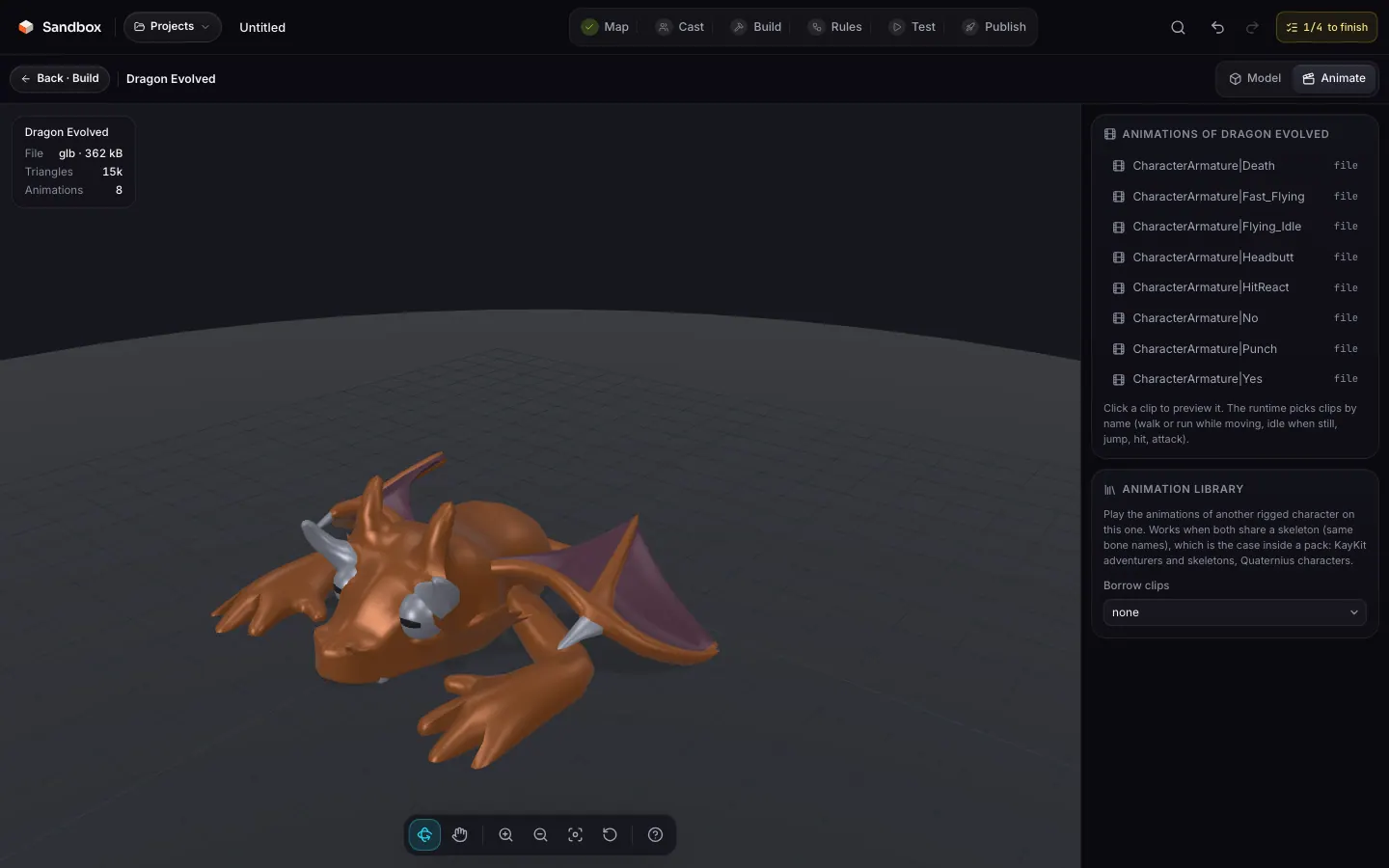
A rigged GLB comes with its own clips; the studio lists them on the Animate surface and a click previews one. They play as they are: the keyframe editor only applies to voxel and built assets. For your own model, export clips named walk, idle, jump, attack, hit from your tool.
The library has 110 models with three clips or more (KayKit and Kenney characters, Quaternius creatures…).
Borrowing animations
A rigged character without animation can play another library character’s clips. In the “Animation library · borrow clips” section, pick a source rig: its URL is stored in model.animFrom, and its clips add to the model’s own.
Same skeleton required
{
  "format": "glb",
  "url": "https://…/library/kaykit-rogue.glb",
  "animations": [],
  "fit": 1, "lift": 0, "height": 1.8, "bytes": 1048576,
  "animFrom": "https://…/library/kaykit-knight.glb"
}